New tool I made for Vista: Start++
UPDATE
Lots of people are linking to this post. A much better place to link would be to the new Start++ web site. Thanks!
I’ve decided to share a little tool that I wrote on a whim a week or two ago for Vista. This is a personal project of mine, not related to MS in any way.
Users of WDS on XP may recall the “Deskbar Shortcuts” functionality that allows you to create little aliases between words or characters with commands and searches. For example, you could set up the Deskbar so that you could type “g Stuff” to search for the work “Stuff” on Google. You could also launch programs, run scripts with parameters, and more.
Windows Vista replaced the Deskbar with Instant Search built-in to the Start menu, which is totally awesome. Unfortunately, it lacks all of that fun shortcut functionality that the Deskbar had. Unless you have my tool, which for the time being I’m calling Start++.
Here are a few of things it does:

This will open the “Longhorn Server” page on Wikipedia.

This will launch Visual Studio with administrator permissions.
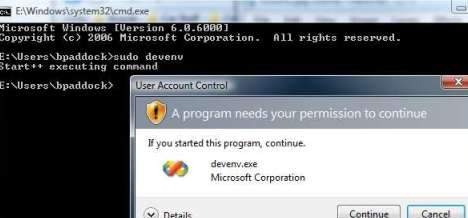
Start++ also works from the command line!

Search Actions let you perform actions over search results. In this case, “Play Radiohead” will:
- perform a search for music with the keyword “radiohead”
- Write all the results to a .M3U file
- Open the results in Media Player
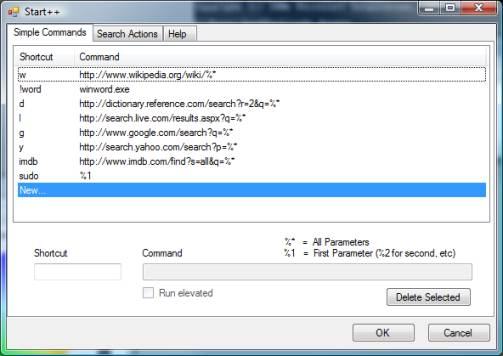
That’s the configuration UI, which lets you create your own custom commands / aliases.
Like I said, this is kind of something I threw together, so it might still have some bugs, and I’ll probably add more to it when I get the time on weekends and such. Anyway, let me know what you think.
Trackbacks & Pingbacks
- Ultimate List of Free Windows Vista Software from Microsoft
- Search++ pour Windows Vista | BorisSchapira.com
- Windows goodies « &More design
- Vista gets a bunch of third party sexyness :) | NexTechNews
- Start++ - Extend Windows Vista Start Search Functionality! » Kristan Kenney’s Digital Life
- Start Menu Utility Start++ | Go IT Expert.com
- DanieleSemeraro.it — Downloadblog » Start++, una marcia in più alla barra di ricerca di Vista
- 160 najbolja Vista trika - Strana 9 -
- Windows Vista (EN) - Strana 32 -
- Power Up Your Start Menu Search Box in Windows Vista | FreeShareGet
- Extend Vista start menu search functionality with Start++ – Bharath Kumar
Comments are closed.
Thanks brandon for sharing such tool
start++ rocks!
Great tool.
Make sure to get this sort of idea into Windows 7. You’ve done a good thing bringing this to Vista, but it’s such a useful thing I think everyone would benefit from this – not just those who know…
A really nice tool! I especially like the capability to use search sites while entering a search term. I was able to figure out how to add a “th” entry which searches a thesaurus, an “md” entry which searches a medical dictionary, and a “te” entry which searches a tech encyclopedia. However, I would really like to be able to add a search for a technical computer term at webopedia.internet.com to my current list of aliases. I haven’t been able to figure out how to do it. The problem is that, for example, a successful search for the term “page fault” is displayed at this page:
webopedia.internet.com/TERM/p/page_fault
and I don’t know how to do that. Anybody (including Brandon Paddock) got ideas?
hey the program Start++ isnt working for me it says that i need “windows 6.0”
please help!?
ЕÑÑ‚ÑŒ интереÑные поÑÑ‚Ñ‹, но Ñтот офигенный проÑто!
Ура!, тот кто пиÑал веÑело отжег!
Ðфтар зачет
Подбор текÑтов хороший удачный, помещу Ñайт в избранное.